
As McNeel quietly rolls out Rhino 9, Campbell Yule reports on how the company is embracing AI, accelerating development and reshaping its software while retaining its distinctive business model.
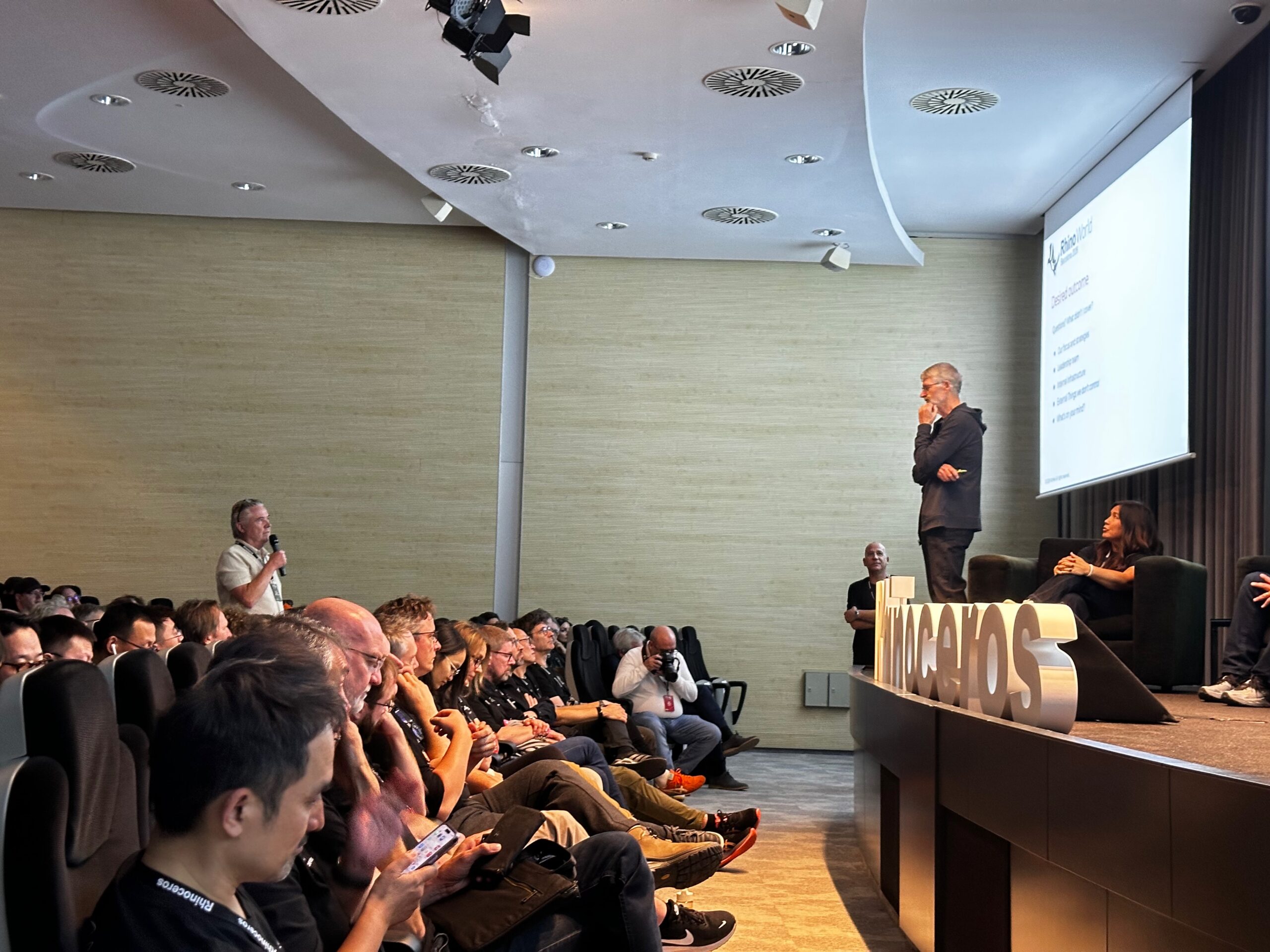
On the final afternoon of Rhino World 2026, in a session that had not been on the agenda and was added to fill a gap, someone in the audience asked the question that had hung over three days of talks about Rhino 9. When will it ship?
“When do you want it?” asked Bob McNeel, the company’s founder and CEO.
“Yesterday,” came a shout from the floor, followed by: “Next week. But not Monday.”
“So Tuesday? Or how about Wednesday? I’ll see what we can do.”
Five days later, on Wednesday 28 October, Rhino 9 was released. True to form, it happened quietly. The buy and downloads pages were updated, and on the day the Rhino home page still said Rhino 8.
It was a very McNeel way to set a launch date. There was no countdown and no date on a slide, just a conversation with the room that turned into a commitment. Much of the week had that character. The way McNeel sells Rhino has not moved, and the company made a point of saying so. However, the way it builds Rhino has changed since March, and AI is the reason. Bob McNeel summed it up in his opening keynote: “Nothing’s changed, everything has changed.” That raises a question McNeel didn’t put on a slide. What happens to a company that still sells software the old way once AI changes how quickly it can build it?


Discover what’s new in technology for architecture, engineering and construction — read the latest edition of AEC Magazine
👉 Subscribe FREE here
Rhino World is McNeel’s partner and user gathering, held every few years and organised this time by McNeel Europe. The 2026 edition ran from 21 to 23 October at the Gran Hotel Rey Don Jaime in Castelldefels, just outside Barcelona. Around 330 people attended, roughly 50 more than in 2023, when the event coincided with the launch of Rhino 8. The increase was deliberate. McNeel opened the event to users as well as resellers, and still ended up with a long waiting list. Bob McNeel reminded the room that the first Rhino World, around 30 years ago, had six resellers in it. It’s also five years since AEC Magazine last spoke to McNeel at length, for the Rhino 7 interview in 2021.
What stays the same
Bob McNeel’s keynote spent less time on product than on the company, and the message was blunt. “Without customers, we have nothing. Without users, we know nothing.” McNeel has no outside investors and is not building a business to sell, a line that drew applause from the room. The job, as he described it, is to turn the tens of thousands of people who evaluate Rhino every month into expert and enthusiastic users, and to do it at a profit and at scale, without giving up the first for the second.
For Rhino 9 that means very little changes commercially. Prices and upgrade costs are unchanged, and an upgrade costs the same whichever earlier version you’re coming from. As with previous releases there’s a promotional upgrade price, this time until 1 March 2027. Student pricing, licence management, evaluations and technical support carry on as they were.
The one change works in the customer’s favour. A Rhino 9 licence will also run Rhino 6, 7 and 8, so nobody needs a separate licence to keep an older version going, and resellers no longer need to hold stock of old versions. Service releases continue on the second Tuesday of each month, as they have through 37 releases of Rhino 8. The first Rhino 9 service release is due within a month of launch. The Rhino 10 WIP will follow soon after, although Bob McNeel expects it to have little in it at first.
The business model also sets the release cycle. With no investors to report to, and no maintenance contracts or subscriptions to justify, McNeel has never been tied to the annual release that has become the norm in AEC software. It works on a version and releases it when it is ready. Rhino 9 arrives three years after Rhino 8. Rhino 10 may not take as long.
Why we’re all developers now
The ‘everything has changed’ half of the keynote began with technology strategy. McNeel has always preferred to let a new technology settle before acting on it, watching whether it takes hold and how people use it. With AI, Bob McNeel said, that approach no longer works. “We have to pay attention every day, every week.” His slide spelled out what that means. McNeel will no longer avoid ‘bleeding-edge’ technology. It uses AI internally as a development and testing tool, it wants AI access from inside Rhino on every platform, and it will expand support for tools built with AI. AI has been a particular focus since March.
Steve Baer, a McNeel developer for more than 20 years who leads the Rhino development team and now sits on the board, described what that has meant in practice. The team had experimented with AI for some time without much changing. Then Claude Opus arrived. Baer told the rest of the management team he expected a 20% improvement in productivity. By his account, what they got was closer to three times.
On the last morning, Baer and Andy Le Bihan, McNeel’s head of visualisation development, put numbers to it in a talk subtitled “Why we’re all developers now”. Between October 2022 and June 2026 the two of them averaged 3.3 merged pull requests per working day. From August to mid-October the figure was 9.5. They now work on several problems at once, across three computers, so that one task moves forward while another builds or tests.
Crashes go through an automated process that runs overnight on Mac and Windows. Written as a state machine in a markdown file, it reads the crash dump, identifies the likely cause, tries to reproduce the crash, attempts a fix and tests the fix against the reproduction. The developers have also connected their AI tools to McNeel’s internal systems, so they can ask for a diagnosis of a specific bug logged in the YouTrack issue tracker. The fixes are not limited to the new version. In Baer and Le Bihan’s own work, the number of Rhino 8 issues fixed each month rose from an average of 15 in the first half of the year to 28 over the summer.
None of this is vibe coding. Changes are still reviewed before they are merged. One of the less obvious gains is in understanding code. Le Bihan uses AI to read and explain code written by colleagues, which got him up to speed far faster than reading it alone. The time AI frees up has gone into a focus on performance that was not possible before, with AI helping there too in the same supervised way. According to Scott Davidson, of McNeel’s business development team, Rhino 9 is the first version of Rhino that is faster than the one before it (see ‘Rhino 9 at a glance’).
The other lesson, Baer said, was that the SDK is the doorway for AI. RhinoCommon, Rhino’s .NET SDK, has gained more than 150 new public types and 2,200 public declarations, and there is a C++ SDK on Mac for the first time.
Brian James, who works in training and technical support at McNeel, showed what that looks like from outside the development team. “I don’t write or read code,” read the first slide of his talk. He has still published four free, MIT-licensed plug-ins through Rhino’s Package Manager, among them Woolly Rhino, which grows hair as thin meshes on a selected object. He built them with Claude Code, connected through an Model Context Protocol (MCP) server to a live copy of Rhino, with GitHub Desktop as “an undo button for every experiment”. What he brings, his slide said, is “a very clear idea of how Rhino ought to behave”. For Woolly Rhino, that meant he could tell the AI which approach to take, such as joining the individual hairs into a single mesh to keep Rhino fast. That knowledge turns out to be the part that is hard to automate. His somewhat tongue-in-cheek advice to anyone worried about their job was simple. “If you’re scared you’re going to be replaced by AI, use AI to replace someone else.”
Rhino 9
Rhino 9 itself is a large release. McNeel counts more than 100 new features and, rather than list them, has grouped them into 13 ‘stories’, from freeform and organic modelling to drafting, large projects and the developer platform. Each story explains what has changed and why, and each feature comes with a step-by-step ‘try it’ (see ‘Rhino 9 at a glance’). Two areas get the most attention: freeform modelling and 2D drafting.
Some changes are less visible, but expand the places where Rhino can run. A new Direct3D display pipeline on Windows improves stability and adds support for Windows on ARM, and for Rhino running in virtual machines under VMware and Parallels. That matters to schools, many of which now use ARM hardware.
Grasshopper 2 ships with Rhino 9, and it’s less an upgrade than a new product. A pair of components called Shout and Listen pass data from the end of one script to the start of another, which makes definitions more modular. Metadata now travels with the data, so floors can be tagged ‘Floor 1’, ‘Floor 2’ and so on, and display rules can then hide, show or tint geometry by those tags, for example colouring a building floor by floor. Multi-threaded solving means sliders on complex definitions no longer freeze the interface while later stages recalculate.
Grasshopper 1 hasn’t been abandoned. It’s still maintained and gains features of its own in Rhino 9, including render materials, hatches, clipping and sections, and widgets that drive a definition directly from the Rhino viewport. Definitions can be migrated to Grasshopper 2, but not every third-party plug-in has made the move. For AEC teams whose work depends on those plug-ins, Grasshopper 1 will stay the working version for a while yet.
Towards the drawing set
For most AEC firms Rhino is where design happens, and Revit or Archicad is where it gets documented. Rhino 9 moves that line.
When I asked Davidson why Rhino 9 puts so much into documentation, his answer was that it was “user driven”. “Most users want a single application.” Every extra application between a design and a finished drawing adds time and friction, and another chance to lose data along the way.
His drafting session was aimed squarely at the drawing set. Section styles set how each material is cut and hatched, and can be saved and reused on any object, layer or clipping plane. Clipping drawings generate 2D sections from the 3D model and stay live to it, updating as the model changes. Rich text brings lists, tabs, subscripts and superscripts, and text masks that frame and highlight notes. Alongside these come drafting symbols and title blocks, line types that can carry text, and markups for reviewing drawings with the rest of the team.
Large projects get attention too. Worksessions, which split a big project across several files, have been reworked. On McNeel’s benchmark, switching the active model in a four-model, 660 MB Worksession now takes 2.5 seconds instead of 30. For practices that already produce drawings in Rhino, or would like to, this is the most practical part of the release.
Rhino.Inside, which runs Rhino inside other applications, remains McNeel’s main bridge to BIM, and Davidson set out who builds which connection. McNeel builds Rhino.Inside.Revit, which is open source, and, with bimorph, the version for AutoCAD and Civil 3D. Trimble builds the Tekla Live Link, Bricsys has built Rhino into BricsCAD BIM, and cadwork has its own connection for timber construction. A Rhino.Inside SDK lets other developers do the same for their own applications. Rhino.Inside.Revit now has 373 Grasshopper components, from walls, floors and families to views, sheets and schedules.
Rhino still has no native IFC export, a request that has sat on McNeel’s own forum since 2021. Firms that need it rely on plug-ins. VisualARQ and RhinoLands, both from Asuni, sit on top of Rhino and add BIM objects for architecture and landscape respectively, and export IFC.
Of the newer cloud-based BIM tools that connect to Rhino, two were on the expo floor. Motif showed Motif Design, the agent-native building design platform it launched in September.
Motif Design is a separate product from Motif Review, the company’s earlier collaboration and review tool, but it works on the same principle. Connectors inside Rhino and Revit stream models into Motif without export or conversion, and there they can be combined with other models. The information that comes with them can be mapped onto Motif’s own building objects or kept in its original schema. Because Motif’s sheets are live views of the model rather than extracts, what arrives from Rhino carries through to the drawings. When AEC Magazine looked inside Motif in September, that included Rhino geometry taken through to shop drawings, with element counts and lengths, without going via Revit.
Qonic showed a feature still in beta: a Grasshopper component that publishes information directly into Qonic. After the first connection, only changes are sent, which keeps the data small and the link responsive. Once a user is happy with their design in Rhino – a complicated façade, for example – they can bake the elements into Qonic and apply metadata such as materials and IFC types. If the design repeats, Qonic’s component system can turn one small part of the import into a component, which then automatically associates itself with every other matching instance.
Davidson’s point cuts both ways. Users may want a single application, but McNeel, Motif and Qonic each have their own view of which one it should be.
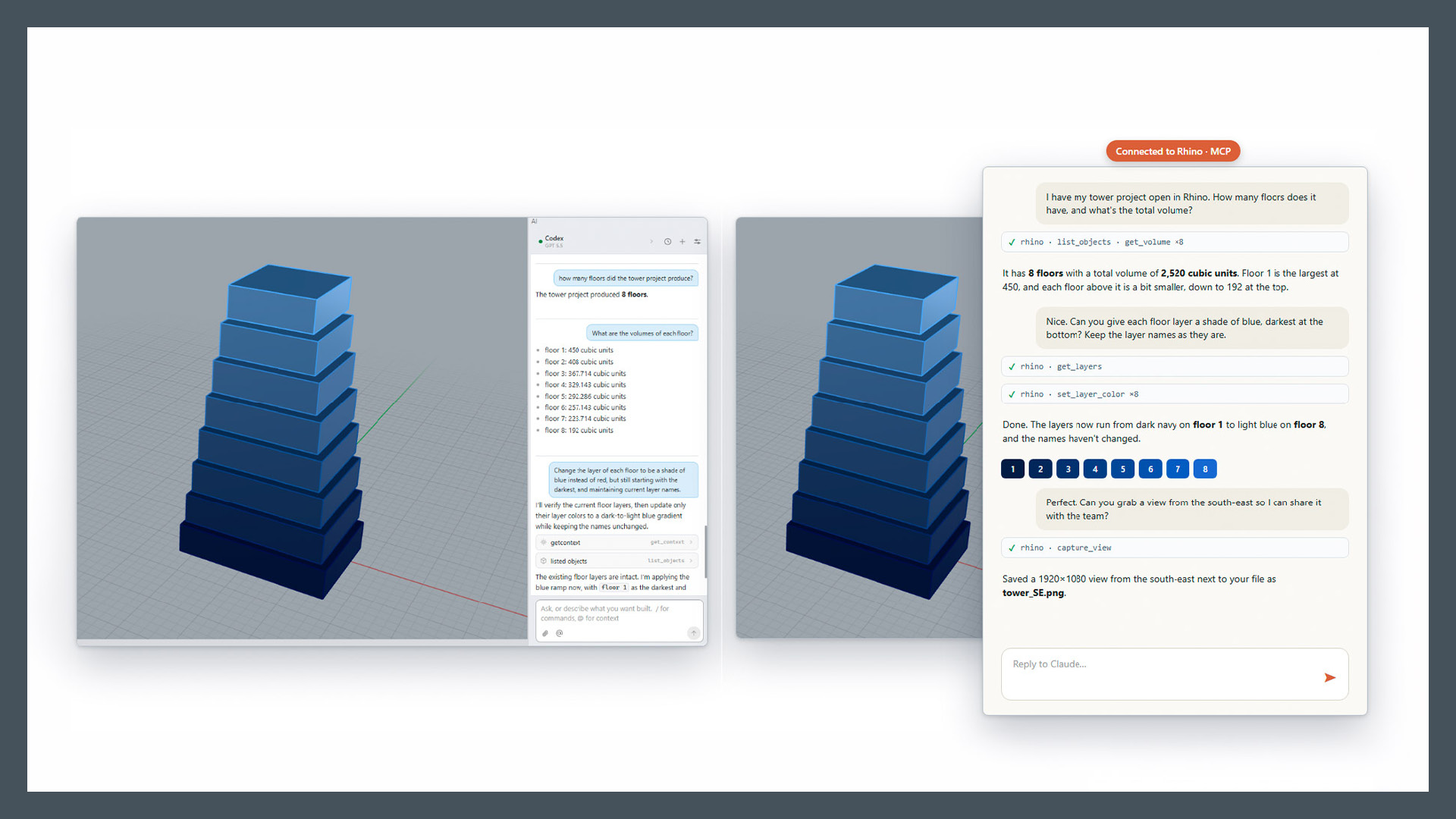
RhinoAI
If Baer’s team shows what AI has done for McNeel, RhinoAI is what McNeel offers everyone else. Callum Sykes, the developer who built it, told the story of how it started. Six months ago he tried a local language model and got poor results. A friend suggested he try Claude Code instead. Six minutes later, as he told it, in rather more colourful language, his reaction was to wonder whether any of them still had a job.
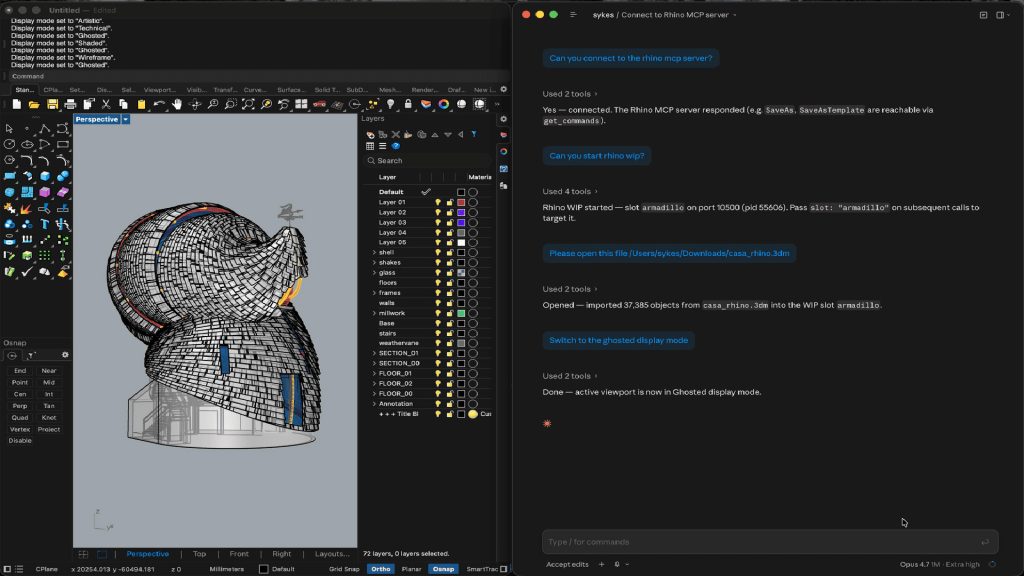
He went on to build RhinoAI with Claude Code, vibe coding it in a way the core team does not. It’s open source, published on GitHub, and connects AI agents to Rhino through an MCP server. It went out on a Saturday, and by Tuesday, in Sykes’s words, the cat was out of the bag. McNeel’s general approach, he said, is to let things run and watch where the wheels fall off.
RhinoAI works in two ways. Inside Rhino, a panel finds the AI agents already installed on your machine, such as Claude or Codex, and works across Rhino, both versions of Grasshopper and rendering. This is the easier route, though not quite as powerful. When it writes a new command it also creates a button, so the command can be run again without the agent. Outside Rhino, you bring whatever model and agent you prefer. The agent can start Rhino and tell it what to do, run several copies at once, and help build and debug plug-ins. Next on the list is SDK access to the panel itself, so developers can build their own skills into it.
None of this is in Rhino’s core. RhinoAI is a plug-in you choose to install, and because it runs on your own agent, the model and its cost are your choice.
Davidson and Gijs de Zwart spent a session on what it can do in practice, presented as a series of experiments. Davidson’s framing was that Rhino is deterministic and AI is probabilistic. “AI is probably right.” It infers the next step, which is often useful but not always correct.
The first experiment was a citrus juicer. Given a three-view line drawing, the agent described the object in detail and then built it, within a 30-minute limit they set to avoid burning through tokens. A note that the cone in the sketch was sharper produced a better fit, and a further prompt turned the result into a parametric Grasshopper 2 model with a slider for each dimension. Because the agent works by writing Python or C# behind the scenes, its output can become a Grasshopper definition, or a dynamic block in Rhino with its own controls.
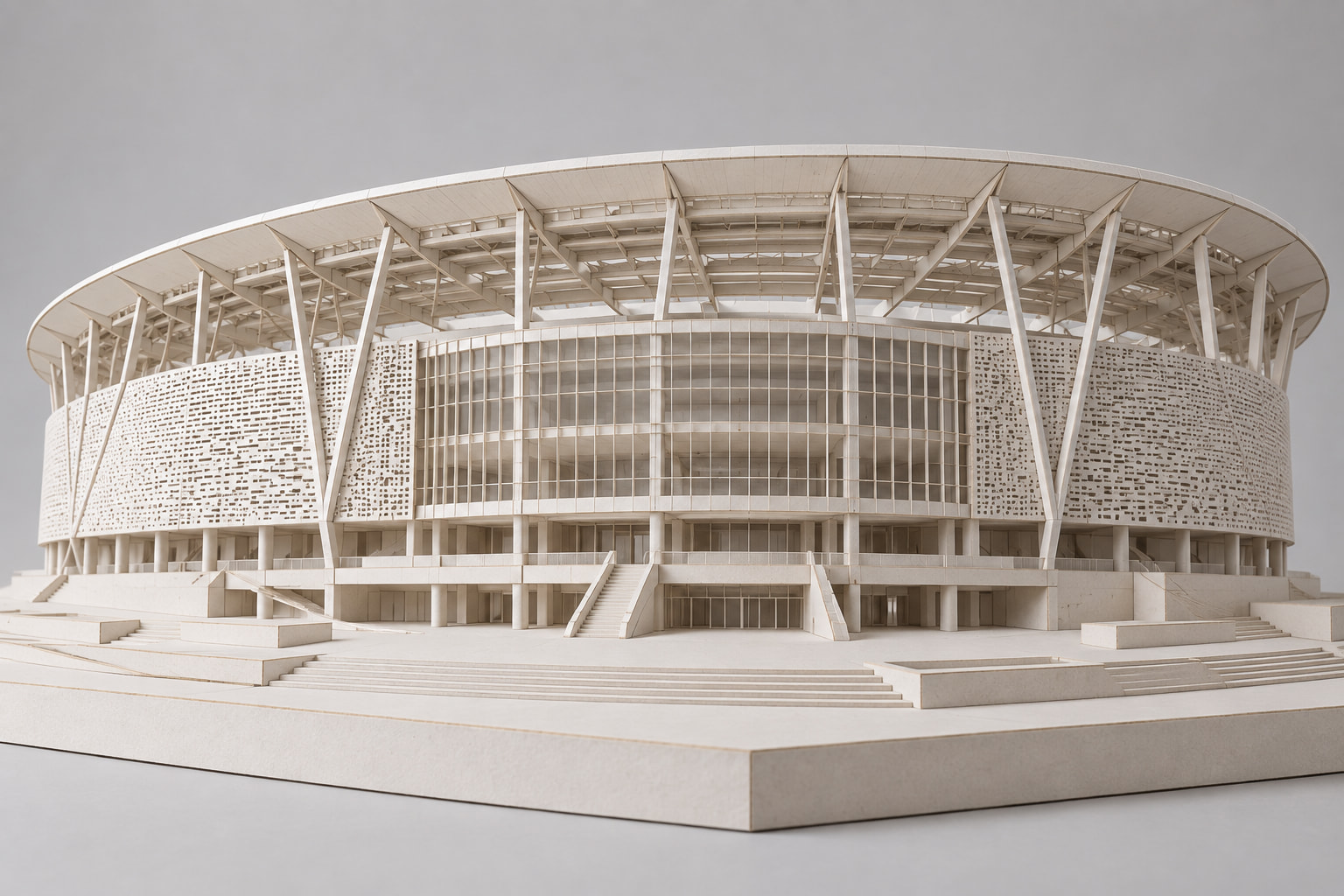
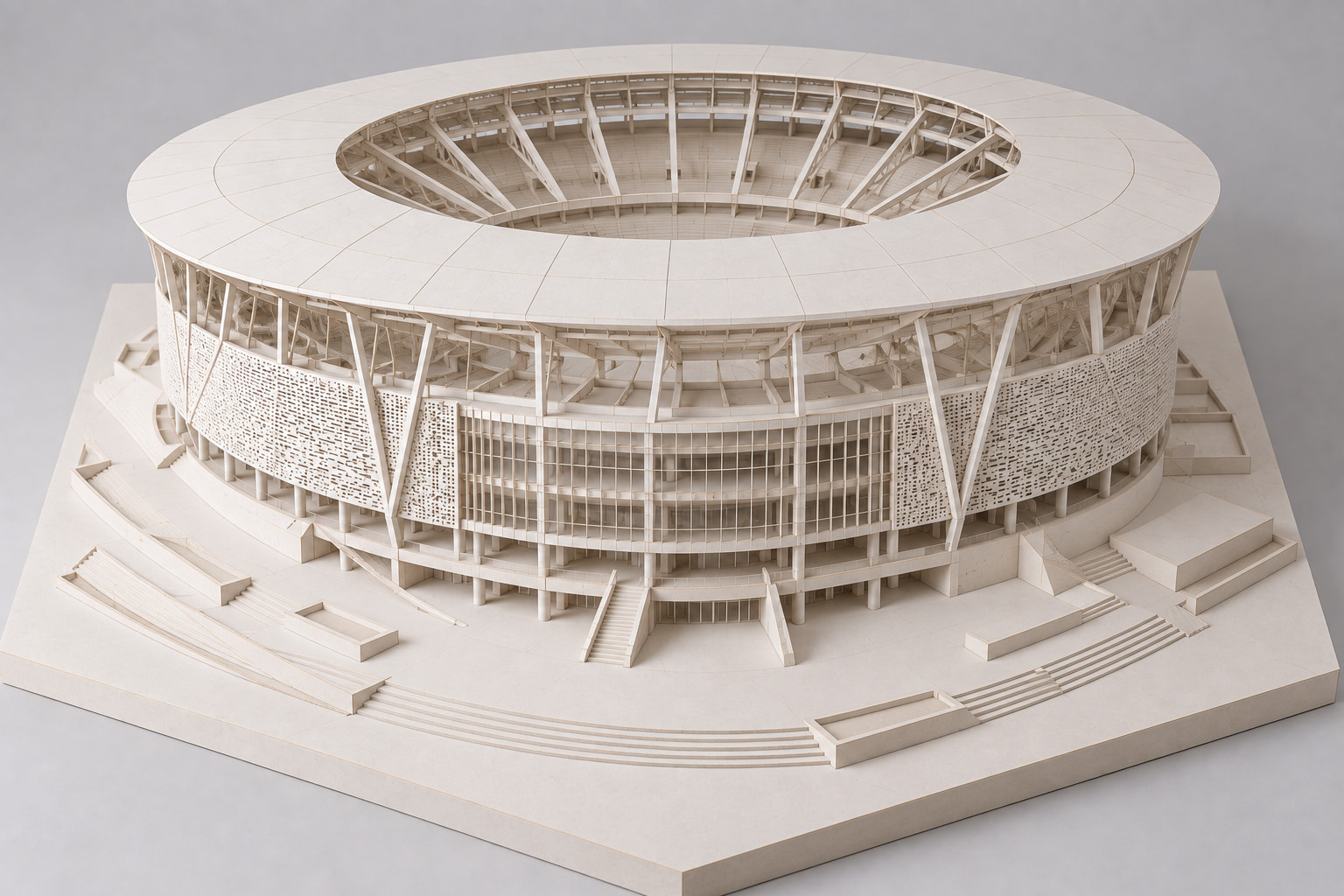
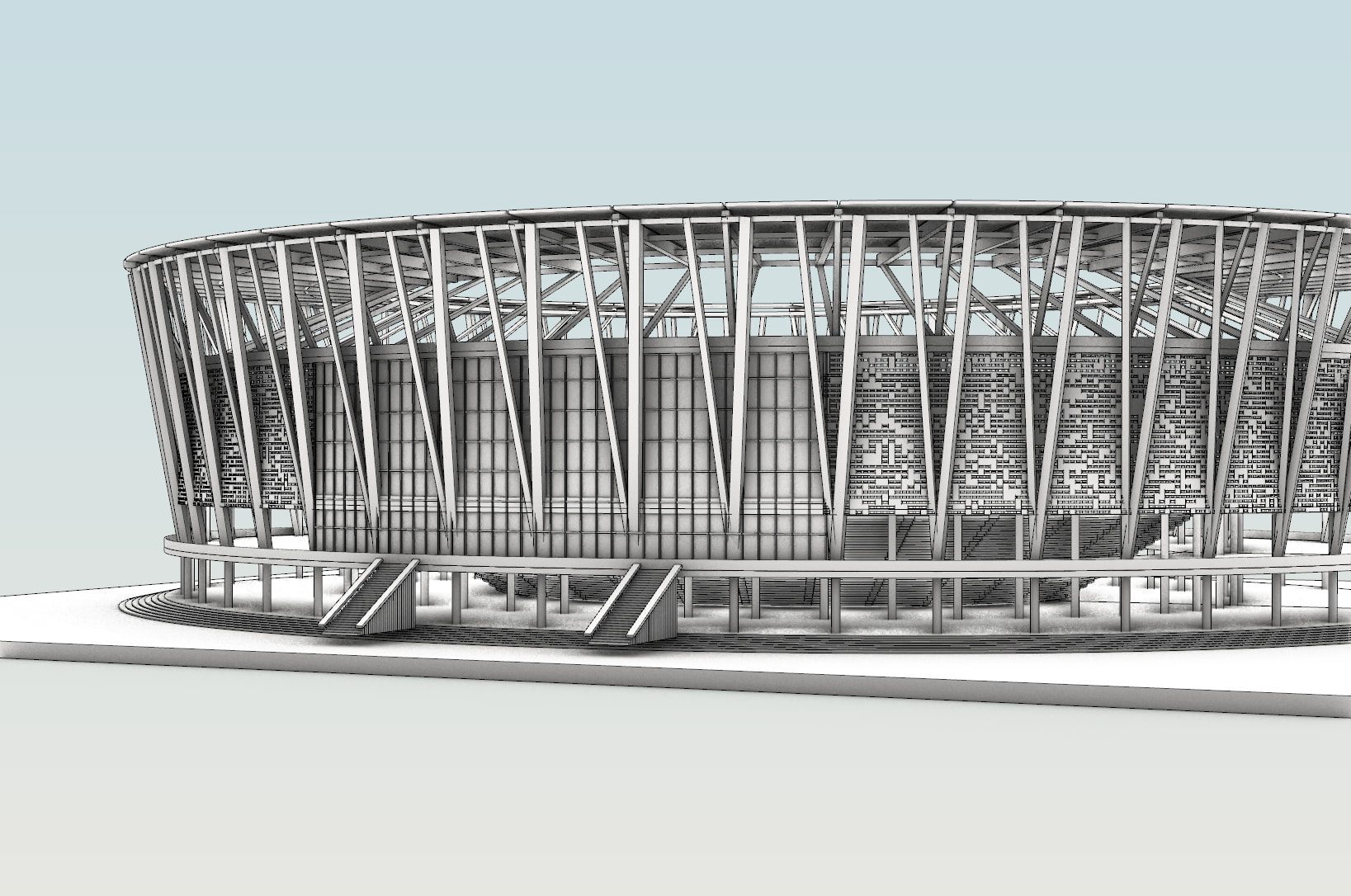
The architectural tests were more uneven. Davidson started with an AI-generated rendering of a stadium and asked the agent to model it. It failed. He went back to the original image and asked the AI for more images of the same stadium, some styled to look like an architectural model. Working from those, the agent did much better, and produced a model with a sensible, well-named layer structure. Further prompts added aisles, tunnels and field walls, with imperfect results that could in turn be improved with more prompting. A kitchen modelled from two photographs was poor until he gave the agent a sketched floor plan. Once furnished, the model served as a placeholder for exploring the space through renderings.
Davidson then outlined a number of utilities that looked immediately practical. They include reverse-engineering imported models, where the agent works out what an object is and then gets more specific, optimising STEP imports, patching holes, and stripping the threads from bolts to simplify a model. One experiment, a furniture schedule, is covered in detail further down the page (‘Putting the (A)I into BIM’).

Rhino in the cloud, quietly
In 2014 Bob McNeel told AEC Magazine that cloud and SaaS were not a near-term target. Twelve years later, Rhino runs on Linux servers and can be paid for by the hour through AWS Marketplace. McNeel has not made much noise about it.
The route is Rhino.Compute, which Luis Fraguada, a developer at McNeel, described as “Rhino.Inside a webserver”. It takes the technology that puts Rhino inside Revit and hosts it on a server, so that Rhino and Grasshopper can be called over the web. Firms use it to run product configurators, to build processing steps into automated pipelines, and to turn in-house design knowledge into tools others can use. McNeel says it has more than 100 users a month, logging more than 150,000 hours.
The news this year is Linux. Rhino.Compute now runs on Linux, on both x86 and Arm processors, and installs through a standard package manager. It is paid for through McNeel’s core-hour billing at $0.10 per core-hour, so a 2-core server running eight hours a day for a month comes to $48, however many Rhino instances it hosts. Alternatively, it can run from a ready-made image on AWS Marketplace and be paid for on the customer’s AWS bill. The attraction is cost. On the cloud pricing Fraguada showed, Linux servers cost roughly half to two-thirds as much as equivalent Windows ones on Azure and AWS.
The Linux version is still a work in progress, and the slide was clear that it is not yet for production work. Loading third-party plug-ins is still being tested, and McNeel asked plug-in developers to get in touch. For AEC firms, whose Grasshopper definitions usually lean on plug-ins, that will decide how soon it becomes useful.
Fraguada’s ‘one more thing’ brought the week’s two threads together. An AI agent, connected through a Rhino MCP server, built a rubber duck in a copy of Rhino running with no screen on an Ubuntu virtual machine, and the result appeared in a browser viewer. It was a small demo. It was also Rhino running on a server, driven by an agent rather than a person with a mouse.
The other 80%
During the keynote questions, someone raised reverse engineering. If AI makes software easier to write, does it also make Rhino easier to copy? Bob McNeel’s answer was that 80% of Rhino is not the software at all. It is the team, the resellers, the community and the training. Having spent three days in the room as a first-time attendee, I’d agree.
It’s a useful corrective to the idea that, because anyone can now write software, software companies matter less. Brian James can publish plug-ins without writing a line of code, and RhinoAI lets any user build their own tools inside Rhino. But James’s plug-ins run on McNeel’s SDK, ship through McNeel’s Package Manager and food4Rhino, the marketplace McNeel says has more than a million users. RhinoAI can only do what the SDK exposes. The code has become cheaper to write. The rest of what Bob McNeel described has not.
Then there’s time. Rhino 9 arrives three years after Rhino 8. The Rhino 10 WIP is due soon after this release, and Baer and Le Bihan are merging nearly three times as many changes a day as their average over the previous four years. The question is whether that shows up in how long Rhino 10 takes.
At a glance: Rhino 9
Status. Released 28 October 2026 for Windows and Mac. Prices are unchanged, upgrades cost the same from any earlier version, and promotional upgrade pricing runs until 1 March 2027. A Rhino 9 licence also runs Rhino 6, 7 and 8.
The stories. McNeel has grouped more than 100 new features into 13 ‘stories’. The ones that matter most for AEC:
- Freeform modelling. A rewritten Patch command, surface fillets, adaptive rebuild and better continuity analysis.
- Direct modelling. PushPull, Inset and an extended Gumball for editing faces directly on the model.
- 2D drafting. Clipping drawings, section styles, non-rectangular details, layout groups, rich text, drafting symbols, title blocks, linetypes and markups.
- Large projects. Faster Worksessions, a better block editor and a tool that shows what is taking up space in a 3dm file.
- Grasshopper 2. Looping, metadata and multi-threaded, cancellable solutions, shipping alongside a still-supported Grasshopper 1.
- A Direct3D pipeline on Windows, with support for ARM, Parallels and VMware.
- RhinoAI, a C++ SDK on Mac, Python 3, .NET 10 and Rhino.Compute on Linux.
Performance. McNeel says this is the first version of Rhino that is faster than the one before it, and its own benchmarks put Rhino 9 well ahead of Rhino 8. Opening a 644 MB DWG takes 11.2 seconds instead of 68.2 (6.1x). Switching the active model in a four-model Worksession takes 2.5 seconds instead of 30 (12x). Moving an 11.8 million-face mesh takes 0.82 seconds instead of 14.02 (17.1x).
Learning. McNeel has invested heavily in learning material for this release, and like performance, it is the best it has been. Each feature in each story has an explanation and a step-by-step ‘try it’. There are 20 modular guides with ‘unfurls’, which expand an explanation in place without leaving the page. That helps anyone who meets an unfamiliar command partway through a guide. There are also around 100 videos, and general Rhino user guides that aren’t tied to version 9.
Putting the (A)I into BIM
I have been around since the term BIM was coined. One of its original promises was simple. Put information into the model, such as a wall’s classification or its specification, and when that wall appears on a drawing it can annotate itself. In practice it rarely worked that way, because the information usually wasn’t decided, or wasn’t available, at the point the walls were being drawn.
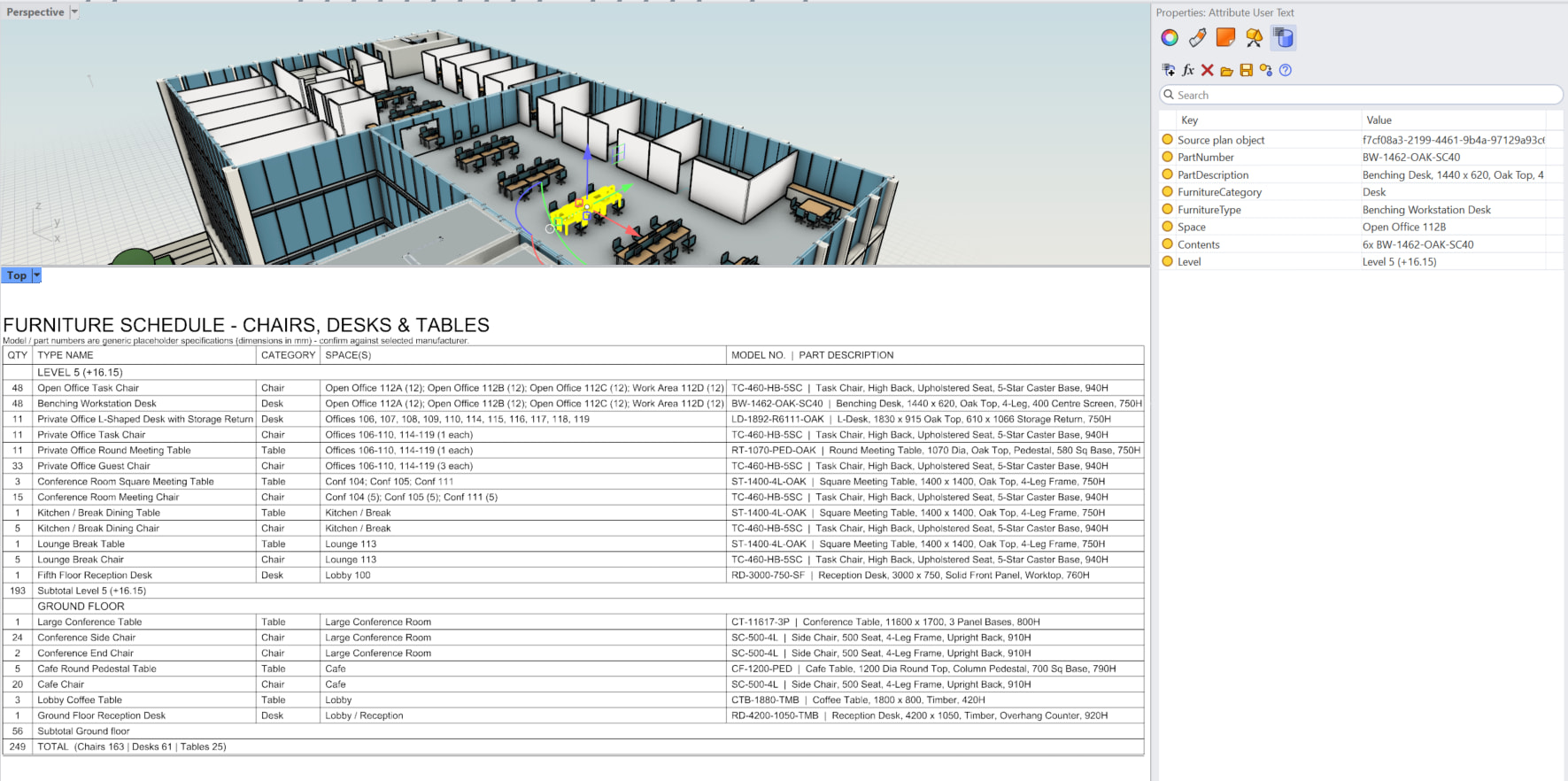
That’s why a small experiment by Scott Davidson caught my attention. He was, as he put it, “just playing around” with RhinoAI, and asked it to create a furniture schedule for an office model. The process ran back to front. The AI created the schedule first and inferred most of its contents, including the names of spaces that had never been defined in the model. It then pushed the data from the schedule back into the model, writing it onto each item as attribute data: its part number and description, its category, the space it sits in and the level it is on.
Once the data was in the model, it could be corrected. Space names that were wrong could be fixed in place, and Davidson’s line that “AI is probably right” held up. Most of the names it chose were reasonable. In a thread on McNeel’s forum he has taken the idea further, tagging layers with their Revit categories, and says he would like to write a RevitAgent.md, a set of instructions for the agent.
Rhino does not claim to be a BIM system, and the idea is not unique to Rhino. MCP servers for Revit and Archicad will let users push data into elements in the same way. What the experiment shows is how a data-rich model can be produced with AI doing the tedious part, at the point in the project where the information is actually.