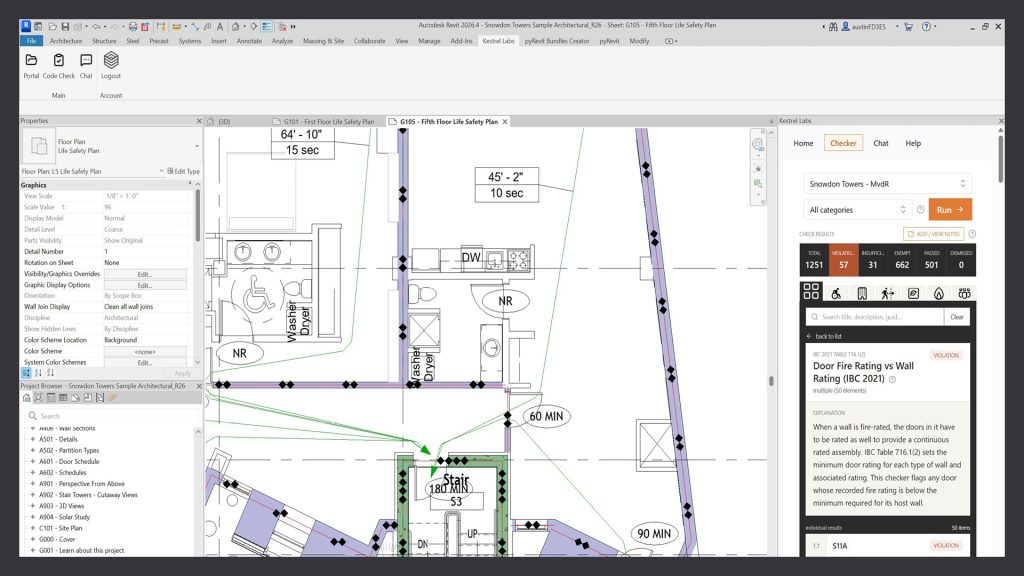

Two years ago there were a handful of compliance tools helping AEC professionals navigate building codes and regulations. There are now at least nineteen. Allister Lewis looks at what is available, what these tools can and cannot do, and what happens when one of them misses something
Rule-based checking software has existed for years in AEC but it required someone to translate written regulation into machine readable rules and then maintain them. That changed with Artificial Intelligence. AI models can read drawings, models and regulations as they are actually written and compare one against the other, without that translation step. That is a major reason why compliance has become one of the fastest growing categories in ConTech.
Compliance matters to clients and contractors because they need the design information to meet the project requirements. Where a building is not compliant the result is delay, additional cost and increased risk, and resolving that early leads to better outcomes on site. This article looks at what compliance actually covers, what the options are and why this is a critical moment for consultants, clients and contractors to consider what this shift means for them.
What compliance actually means
Compliance means meeting a requirement that somebody else has set, and being able to show that you have met it. There is a requirement, there is evidence that it has been satisfied and there is somebody with the experience to check this outcome.
On a construction project those requirements arrive from several directions at once. There are statutory requirements, which in England means the Building Regulations and the functional requirements set out in Schedule 1. There are contractual requirements, for example Employer’s Requirements. There is the client brief and there are also a practice’s own internal standards covering naming, numbering and schedule alignment. All of these are documents and all of them get described as compliance issues however only the first is enforced in law.
Discover what’s new in technology for architecture, engineering and construction — read the latest edition of AEC Magazine
👉 Subscribe FREE here
The distinction that matters when assessing this software is between prescriptive and performance requirements. The Building Regulations set out functional requirements and the Approved Documents are guidance on one way of meeting them. The requirement is the law and the guidance is not. Section 7 of the Building Act 1984 states that failing to follow an Approved Document does not of itself make anyone liable, although it can be relied on as evidence that the regulations were not met. You can comply by another route if you are able to demonstrate that the functional requirement has been satisfied.
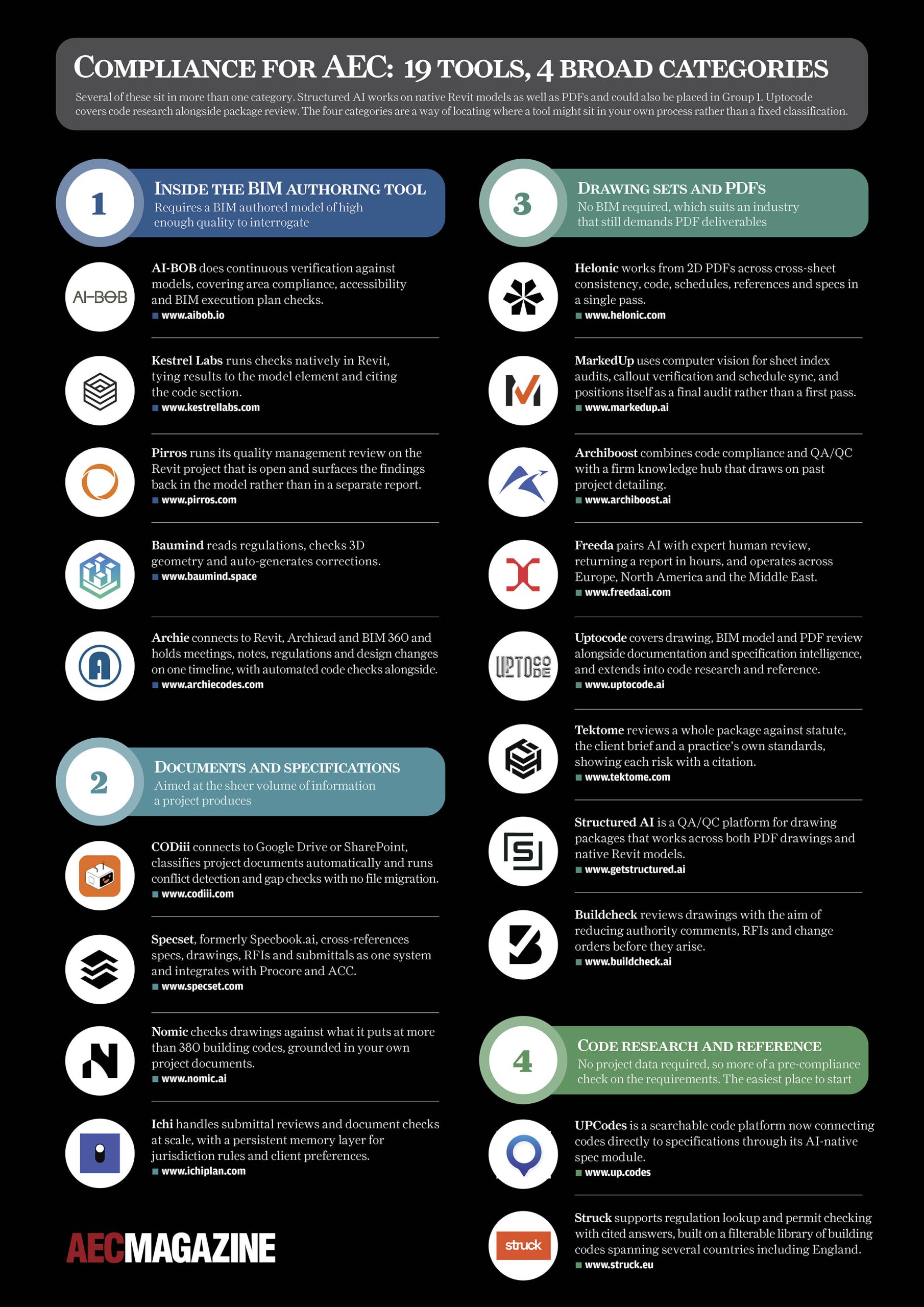
Where a requirement is prescriptive, meaning a dimension, a U-value or a specified product, it can be tested against a drawing or a schedule and a computer can now do that better than ever before. Where it is a performance requirement, such as adequate means of escape for the intended occupancy, demonstrating it takes modelling, judgement and a competent person to sign this off. Each one of the 19 tools below is working the prescriptive side of that line.
Download as a PDF
Who is doing the checking?
The list of tools is not comprehensive, but it is interesting that only a few were built solely for architects. Several are aimed at contractors, where submittal and Request For Information (RFI) volume is highest and the business case is easiest to make. This is important as a tool that can read a drawing set could be used by any actor in the construction process. For example, a contractor can now review one of your packages, and so can a client prior to signing anything off. Intriguingly, Building Control could start to use these tools too.
The opportunity with these tools looks different depending on who is applying it. For an architect it is a way of checking information before issue so that risk during construction is reduced. For a contractor, checking consultant information and being able to push back, query or raise additional RFIs carries a direct financial benefit and variations can be monitored in the same way. For a client it is the ability to check that what has been issued matches the brief and the local regulations, and to interrogate information without being an expert.
That leaves a question for AEC professionals: should we be checking our own work before issue or waiting until a contractor or client does it for us? Compliance checking may happen regardless of the architect performing this and it is probably better to identify issues before an external party does. Reviewing internally first with software, followed by a thorough human review, appears to be a useful combination. The first pass identifies the easily highlighted mistakes and the second is where a skilled professional focuses on the issues that matter. Catching the simple errors early saves time when a package runs to hundreds of drawings The return on investment may rest less on productivity than on the reputational cost of discrepancies revealed externally. To be clear, finding it first could be worth more than just finding it faster.
The ability to load your own project requirements is also more important than it first appears. Building Regulations get read, checked and referenced by someone on every project. A two-hundred-page Employer’s Requirements document, issued at stage two and referenced in your appointment, frequently does not get read by the whole team and that is precisely where contractual risk could be caught earlier.
What if it misses something?
A clear risk area with compliance software is when it misses something. Professional judgement, and reasonable skill and care will always be required and understanding that this is a tool like any other is important. Using one of these may cover the first and simpler review of issues but a thorough look will still be needed to confirm that internal and external standards are being met. None of these products carry professional liability and a review of their terms and conditions is worth doing. None of these tools will be named in your contract, which means the output always needs to be questioned and queried.
The return on investment may rest less on productivity than on the reputational cost of discrepancies revealed externally. To be clear, finding it first could be worth more than just finding it faster
As a comparison, this may emerge into a specialism not dissimilar to clash detection/avoidance and the process for handling outputs already exists in most practices. Clash detection analyses similar problems, which is a long list of findings, some of which matter and many of which do not. It gets a status against each item, an owner responsible for resolving it, a record of what was decided and why, and a review at the end that somebody signs off. The same discipline may apply here, and a compliance report that arrives without that process is a document that has just been received, rather than a check that has been carried out. The evidence of a review is often what may be required later rather than just a review in itself. If a question is asked about a decision two or three years after handover, what protects you may be the record showing that the issue was raised, considered by a named person and resolved for a stated reason.
Choosing a tool
The obvious question is which of these is best for your practice? However, the more useful question is where your own process currently has the least visibility in regard to technical issues or where it absorbs the most time. Architects spend hours reviewing and checking information and in most offices that work is carried by a relatively small number of experienced people. What that means in practice is that a package may go out having been checked only by whoever was available.
Once you know where the gap is, writing a short brief setting out what is required from the software is needed. The group it falls into will narrow the field considerably, and you can test what remains through demonstrations, trial use and question and answer sessions with the vendor. The most useful test is to run it against a completed project where you already know the answers, ideally one where something was picked up late, and to measure it by what it missed rather than what ibt found.
Ask four things before deciding: which regions, jurisdictions and editions are covered; how quickly coverage is updated when an amendment is issued; whether the output is auditable by someone who was not in the room; and where your project data is stored.
Where this ends up
There may not be nineteen options of these tools in two years. Some will be acquired, some will be absorbed into software you already pay for, and some will stop through a lack of funding or users. That is normal for a category at this stage, and it means maturity and longevity are as much a part of the decision as features are. A tool that fits your workflow today may still be the right choice, but it is worth knowing what the alternative would be if it disappears.
What is not in doubt is the direction. Checking will be automated, either by you before the information is issued or by whoever receives it afterwards. The gains are real and worth exploring early, in speed, in confidence in the deliverables, and in knowing that a package has been reviewed to the same standard every time. Just do not mistake the tool for absolution. Professional responsibility still sits with you.
Allister Lewis is an architect and BIM manager, and founder of ADDD, an independent platform that helps architecture practices make better technology decisions. It includes a comprehensive ConTech Database for AEC that now holds close to two thousand tools.