
Open-weight AI models running on new generation workstations are giving AEC firms new ways to automate workflows while keeping data and costs under their control
Most conversations around AI in AEC center on the cloud, and it’s easy to see why. The latest frontier models from OpenAI and Anthropic can interpret drawings, generate code and work with 3D geometry in ways that could only have been dreamed of just a few years ago.
But AEC firms don’t have to send every AI workload to someone else’s server and pay to generate each token. A growing number of powerful open-weight models can run locally, delivering predictable costs, tight control over sensitive IP, and the option to fine-tune models on a firm’s own data. Making that practical, however, comes with its own challenges.
Big AI models need big memory, and most workstations, laptops in particular, run out of GPU memory long before an architect or engineer runs out of ambition. A model that won’t fit in GPU memory will either fail to run or slow to a crawl, regardless of how fast the processor is.
This is where the HP ZBook Ultra G3a mobile workstation and HP Z2 Mini G1a desktop workstation come into their own. Both are built around the AMD Ryzen™ AI Max PRO processor, which combines CPU, GPU and NPU with a large pool of unified memory. The ZBook Ultra G3a offers the larger capacity and can be configured with up to 192 GB, including as much as 160 GB available to the GPU. HP says that is enough to run models of up to 300 billion parameters locally, alongside BIM authoring tools like Autodesk Revit®, all on a single machine. But what can AEC firms do with these powerful workstations?
Talk to your CAD and BIM software
Model Context Protocol (MCP) is emerging as one of the most significant technologies for firms that want to get more out of their existing desktop CAD and BIM tools. It is an open standard that lets an AI model connect to other software, with an MCP server translating the model’s requests into calls to the software’s Application Programming Interface (API). Instead of navigating menus and clicking buttons, users simply describe what they want in natural language.
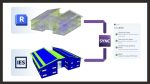
Autodesk has released several . MCP servers also exist for a growing number of other AEC tools, from commercial providers such as AUTOM8LABS to open-source community projects, many built on pyRevit.
Typically, the MCP server runs on the workstation alongside the CAD or BIM software, while the LLM that interprets the user’s request runs in the cloud, on Claude or ChatGPT. But open-weight models such as Nemotron and Qwen can perform similar tasks locally, and the large, unified memory pool of AMD Ryzen™ AI Max PRO processors is now allowing firms to run bigger, or less aggressively quantised, models than would fit on a typical workstation GPU with fixed VRAM.
For Revit, MCP has two main uses: querying Revit models and modifying them. Querying is the easiest place to start. Users could ask, “How many doors and windows are on Level 2?” or “List every room smaller than 9m².”
Firms can connect local LLMs to Revit through MCP, use openweight coding models to develop their own automation tools, and search years of specifications and project data without anything leaving their control
The real power comes when writing back to the model. Depending on the capabilities of the MCP server, users could set up projects, generate grids and levels, edit parameters in bulk (e.g. “For all interior doors, set fire rating to 60 min”), annotate views, produce drawings and even create parametric Revit families. The technology is not yet sophisticated enough to generate a detailed model of an entire building, and all output should be manually checked, but given how fast the technology is evolving, that could change sooner rather than later.
MCP-enabled AI agents could also be used to automate time-consuming Revit QA/QC workflows, such as comparing the model and documentation against the project execution plan, owner guidelines and firm standards.
Lowering the barrier
Beyond hardware, one of the major barriers to local AI has been knowledge and skills. Even installing the relevant AI models has been a challenge. HP’s new partnership with Perplexity promises to lower that barrier significantly.
In Portable Computer mode, Perplexity Computer lets users easily download models such as Qwen or Nemotron and run inference entirely on the ZBook Ultra G3a. Agents can interrogate BIM models and other documents locally, including Revit models through the read-only version of Autodesk’s Revit 2027 MCP server, escalating to a frontier model like Claude or ChatGPT only if the user chooses. HP and Perplexity are also launching exclusive Perplexity ‘Skills’ for code compliance, design reviews and material specification research.
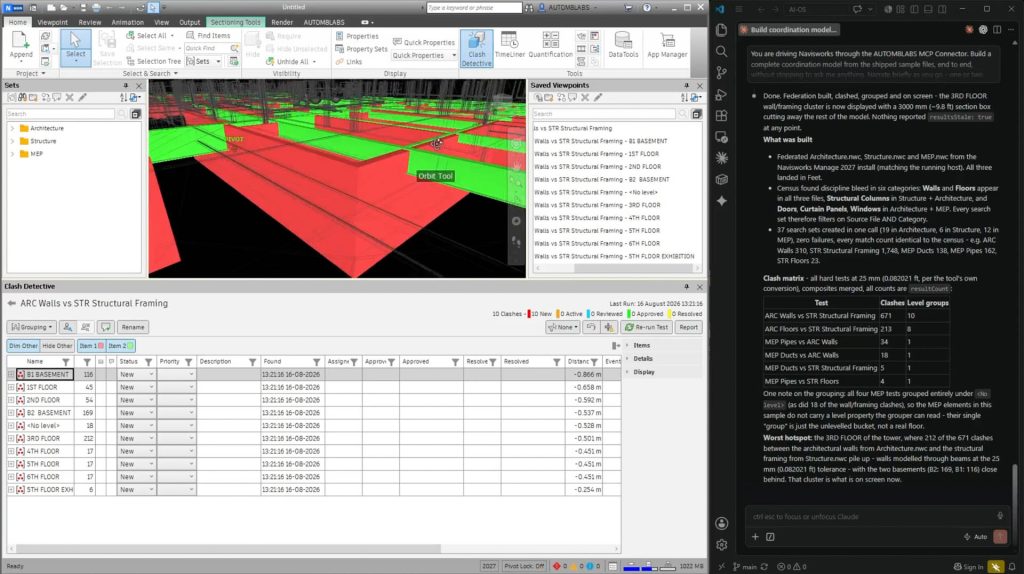
There is no technical reason this must stop at Revit. With the right MCP server, the same approach could be extended to coordination tools, letting non-specialists manage coordination issues simply by asking questions or making requests. For example, with the AUTOM8LABS MCP Connector for Autodesk Navisworks®, users could simply tell the agent to “run the Structure vs MEP clash test and group the results by level” or “export the unresolved clashes from this test as a BCF package.”
‘Vibe coding’ your own tools
AI also opens up significant opportunities for computer programming. So-called ‘vibe coding’, using AI to create scripts and applications by simply describing what you want, doesn’t have to be confined to the cloud. Open-weight coding models such as Qwen3-Coder-Next can run locally on the AMD-based HP Z workstations, so a firm’s proprietary standards, scripts and project data never leave the building.
There are many possibilities. AI can write scripts for computational design tools like Grasshopper for Rhino™ and Dynamo, or produce pyRevit tools, Python scripts that run inside Revit and can be shared across teams as buttons and pulldowns. Firms can even build entire programs using open-source Software Development Kits (SDKs) from organisations such as That Open Company.
Documents, search and AMD software
Beyond MCP and coding, local AI is also very well suited to general work using LLMs. Specifications, proposals, contracts, and company standards represent years of accumulated knowledge that can be difficult to find. A local LLM can summarise, compare and answer questions across those documents without anything leaving the firm’s control.
Perplexity Computer can be configured to work with local files, but the AMD ecosystem offers additional options. AnythingLLM, an open-source app from Mintplex Labs that AMD supports on Ryzen™ AI hardware, is aimed at end users and provides a simple way to chat with local documents. Meanwhile, the provide step-by-step guides for building and deploying local AI applications. The Playbooks are aimed more at experienced software developers, but there are also some for beginners, including one that generates images with ComfyUI and Z Image Turbo.
Practical hardware strategies
AEC firms have several ways to support these emerging AI capabilities. The simplest is to equip individual users with AI-capable workstations: the ZBook Ultra G3a for mobile professionals, or the HP Z2 Mini G1a for desk-based teams.
Alternatively, one or more Z2 Mini G1a systems can act as a centrally managed, on-premise AI resource, delivering shared services across a practice or engineering office. Compact and stackable or easy to rack, with up to five units fitting in 4U, they also offer a practical way to centralise AI without the complexity of building dedicated server infrastructure.
Looking ahead
In AEC, local AI is not a single tool or feature. It is a growing set of technologies that can make familiar desktop workflows faster and more efficient. Firms can connect local LLMs to Revit through MCP, use open-weight coding models to develop their own automation tools, and search years of specifications and project data without anything leaving their control.
That is where the HP ZBook Ultra G3a and HP Z2 Mini G1a fit in. As Windows-based workstations, they run Revit and the rest of the established AEC toolset natively, allowing AI capabilities to sit alongside existing workflows rather than in a separate environment. With the AMD processor’s large, unified memory, firms can explore all these approaches on a single machine without unpredictable cloud bills. As AI becomes as integral to professional workflows as CAD and BIM are today, the firms that experiment early will be best placed to take advantage of what comes next.
Learn more
Main image caption: AUTOM8LABS MCP Connector for Navisworks®