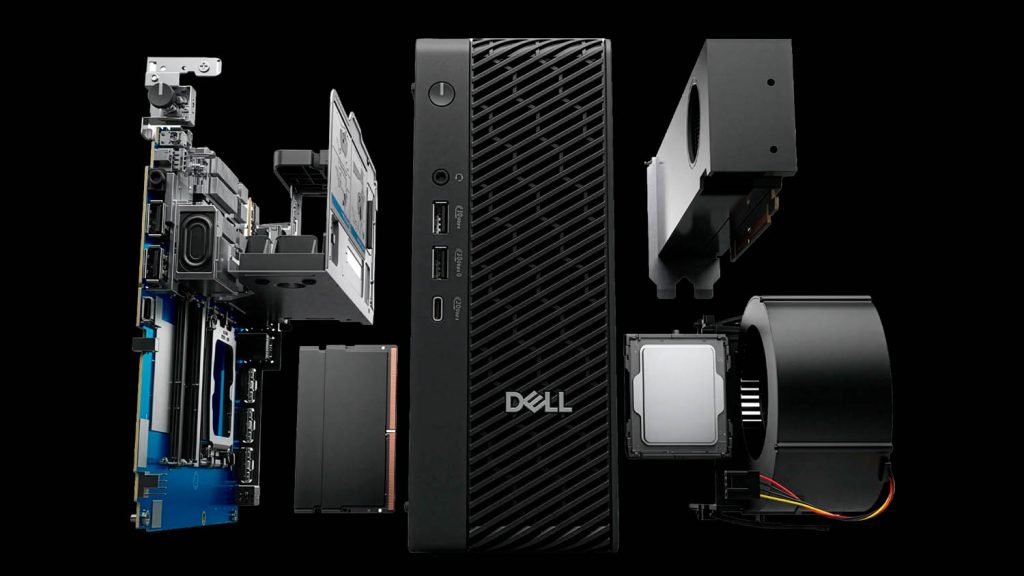
Dell Pro Max Micro Desktop workstation

Can a small workstation handle big BIM?

10 0

Choosing between a tower and a compact workstation can be confusing, especially when they share the same components. Greg Corke explores where small systems shine, where their limitations lie, and when a traditional tower still makes more sense


Compact workstations are big news right now. And not just because they free up valuable desk space.

Machines such as the HP Z2 Mini and Lenovo ThinkStation P3 Ultra SFF are increasingly finding themselves at the heart of modern workstation strategies, including centralised rack deployments where density matters just as much as performance.

But shrinking down a workstation to the size of a lunchbox does not come without compromise. When you cram high-performance CPUs, GPUs, memory and storage into a very small chassis, you quickly run up against the same fundamental constraints that mobile workstations have wrestled with for years: power delivery, cooling and sustained performance.

So the real question is not whether compact workstations are capable — they clearly are — but where their strengths lie, and where a traditional tower workstation still makes far more sense. Let’s break it down by component.

This article is part of AEC Magazine’s 2026 Workstation Special report

➡️ Subscribe here


CPU: peak vs sustained performance

Arguably the biggest challenge for any modern compact workstation is the CPU, which can consume a lot of power. But when you look at the specs things can get confusing. Lenovo’s ThinkStation P3 Gen 2 range illustrates this perfectly. Both the P3 Ultra SFF (read our review here) and the larger P3 Tower can be configured with the same top-end processor, the Intel Core Ultra 9 285K. On paper, that suggests a level playing field. In practice, however, the realities of power delivery quickly create an imbalance. While the processor has a base power of 125W and can boost up to 250W under Turbo, the P3 Ultra SFF is constrained by its thermals and a 330W power supply. Meanwhile, the more spacious P3 Tower has bigger fans, better airflow and can be equipped with a 1,100W PSU. All of this can have a profound impact on sustained CPU performance.

But there’s no sign of imbalance under single or lightly threaded workloads, which describes the vast majority of CAD and BIM tasks. When modelling in Revit or Solidworks the difference between the two machines is negligible. Most workflows within these applications engage one or two CPU cores, allowing the processor to boost to its highest Turbo frequencies. In this scenario, both the compact P3 Ultra SFF and the P3 Tower will deliver very similar performance.

Advertisement
Advertisement

The picture changes dramatically when all 24 cores are brought into play. In heavily multi-threaded workflows such as CPU rendering or simulation, sustained power becomes critical. The P3 Tower has the thermal and electrical headroom to feed the CPU closer to its 250 W Turbo limit, keeping all cores running at significantly higher frequencies for extended periods.

By contrast, the compact P3 Ultra SFF simply cannot dissipate that amount of heat and CPU power will likely peak at around 125W. The result is much lower all-core frequencies and, inevitably, lower performance in sustained multi-threaded workloads.

Meanwhile, Dell provides much more obvious boundaries between its different Dell Pro Max desktop workstations. The super compact “Micro” model only supports 65W CPUs, up to the Intel Core Ultra 9 285, but claims to run this up to 85W. Meanwhile, it’s only the larger Dell Pro Max “SFF” and “Tower” models that come with the 125W Intel Core Ultra 9 285K.

GPU: smaller doesn’t mean weak

Graphics is another area where compact workstations have traditionally been seen as compromised — but that perception is increasingly outdated. In a compact workstation, you are usually limited to low-profile GPUs with a max Thermal Design Power (TDP) of around 70W. The latest options include the Nvidia RTX Pro 2000 Blackwell (read our review) and RTX Pro 4000 SFF Blackwell. Meanwhile, in a tower — even an entry level tower — you can step all the way up to a 300W GPU, such as the Nvidia RTX Pro 5000 or 6000 Blackwell which come with a whopping 48 GB and 96 GB of GPU memory respectively.

A few years ago, the performance and feature gap between a “2000-class” and “6000-class” GPU was substantial. Today, thanks to rapid advances in GPU architecture, and a trickling down of Nvidia RTX technology with RT cores for ray tracing and tensor cores for AI, the story is far more nuanced.

Graphics is one area where compact workstations have traditionally been seen as compromised — but that perception is increasingly outdated

Cards like the RTX Pro 2000 Blackwell and RTX Pro 4000 SFF Blackwell are not only more than capable of handling the most demanding CAD and BIM workflows, but can deliver smooth, responsive viewports and fast rendering in design viz tools like KeyShot, Enscape and Twinmotion. Importantly, these cards ship with 16 GB and 20 GB of GPU memory respectively, which is ample for many real-world design datasets.

Integrated graphics has also taken a significant leap forward. The AMD Radeon 8060S GPU built into the HP Z2 Mini G1a’s AMD Ryzen AI Max+ Pro 395 processor, can comfortably handle CAD, BIM and entry-level visualisation workflows. Furthermore, thanks to fast, direct access to up to 96 GB of system memory, it also has a surprising advantage when working with extremely large datasets that might otherwise exceed the limits of discrete GPU memory.

All considered, there are still clear boundaries between workstation form factors. If your workflows are heavily focused on GPU-accelerated visualisation, simulation, or AI, a tower workstation remains the obvious choice. The ability to install a high-wattage GPU with massive onboard memory is something most compact systems simply cannot match.


Where limits become visible

Modern design workflows are rarely single-task affairs. It’s increasingly common to use CAD or BIM alongside other tools such as visualisation, simulation or reality modelling.

For CAD-centric hybrid workflows, compact workstations generally cope fairly well. Running a GPU render in the background while continuing to model is usually fine, especially if the CPU load remains relatively light. However, problems arise when both the CPU and GPU are pushed hard at the same time.

If you kick off a heavily multi-threaded CPU task while simultaneously running a GPU-intensive workload, a compact workstation will almost certainly struggle. Limited thermal and power headroom could mean one or both components throttle, leading to noticeable slowdowns across the system.

Tower workstations, by contrast, are designed for exactly this kind of concurrent workload. With far greater cooling capacity and higher sustained power delivery, they should do a much better job of keeping both CPU and GPU operating at high performance levels simultaneously.

Choosing the right tool for the job

Compact workstations have come a long way. For CAD or BIM professionals focused on 3D modelling and lighter viz workloads, they can deliver outstanding performance in an impressively small footprint. They are energy-efficient, and increasingly powerful, especially when paired with modern GPUs. And, of course, the space-saving design brings huge benefits to desktops and datacentres alike.

But physics still applies. When workflows demand sustained multithreaded CPU performance, top-tier GPU power, or heavy concurrent workloads, the limitations of a small chassis become apparent. In those scenarios, a traditional tower workstation remains the undisputed performance leader.

The good news is that this is no longer a question of “can a compact workstation do the job?” but rather “which job is it best suited for?” Choose wisely, and a small workstation can punch well above its modest weight.


Main image: Dell Pro Max Micro Desktop workstation


This article is part of AEC Magazine’s 2026 Workstation Special report

Advertisement

Leave a comment