Lenovo

Lenovo Access: simplifying remote workstations

9 0

Think remote workstations are complicated? Lenovo begs to differ. With its new ThinkStation P-Series-based ‘solution blueprints’, the workstation giant is looking to take the mystery — and the headaches — out of deployment, writes Greg Corke


Lenovo workstations have been centralised for years, but a dependable remote workstation solution involves much more than simply putting machines in a server room or datacentre. Traditionally, centralising workstations has been left to experts, given the layers of hardware and software involved to ensure predictable performance and manageability. Lenovo Access aims to change that, providing a framework that makes the deployment of remote workstation environments easier and more accessible to a wider range of IT teams.

Instead of carving up shared servers, Lenovo Access centralises one to one physical desktop workstations – the ThinkStation P series – in racks, then layers on management, monitoring, brokering and remoting protocols. The result is a suite of remote workstation solutions that, to the end user, feel like a powerful local workstation, but behave like a managed solution.

At its core is a big emphasis on user experience, and performance, something that’s incredibly important to architecture, engineering or construction firms. As Mark Hirst, Lenovo’s worldwide workstation solutions manager — remote and hybrid, puts it, when you look at typical AECO applications, “It’s all about hitting that turbo clock, it’s all about instructions per clock, as that’s how you get the performance.”

This article is part of AEC Magazine’s 2026 Workstation Special report

➡️ Subscribe here


That’s exactly what you get with Lenovo Access, especially with the ThinkStation P3 Series, which features Intel Core processors with Turbo frequencies of up to 5.8 GHz, significantly more than you get with a typical processor used for Virtual Desktop Infrastructure (VDI) or cloud.

Access didn’t emerge in a vacuum. Lenovo has been iterating this approach in public at NXT BLD, Autodesk University, and Dassault Systèmes 3DExperience World for several years. But customer priorities shifted sharply during and, especially, after the pandemic.

According to Chris Ruffo, worldwide segment lead for AEC and product development in the Lenovo workstations group, the moment came when firms realised remote work wasn’t a short term exception but the new baseline. Many customers, he recalls, said they needed “to deliver a consistent compute experience, a consistent BIM / CAD experience, no matter where they work — at home, in the office, on the job site, in the boardroom.”

Advertisement
Advertisement

Workstation-first

In many ways, Access serves as a subtle rebuke of traditional VDI for design workloads. Rather than virtualising a graphics server to behave like multiple CAD boxes, it starts with actual workstations and exposes them remotely.

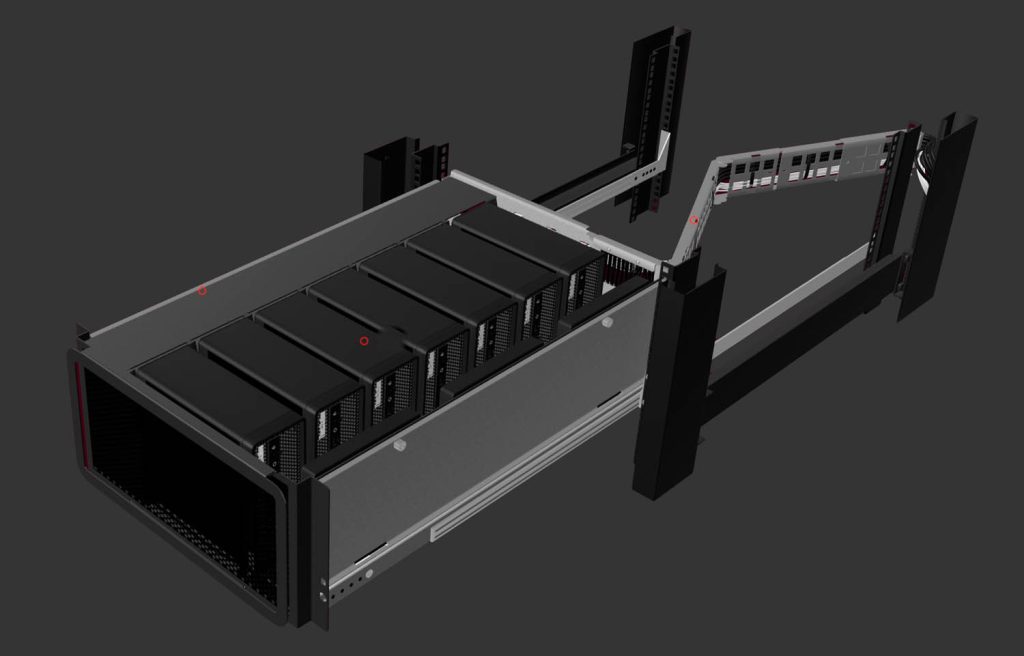
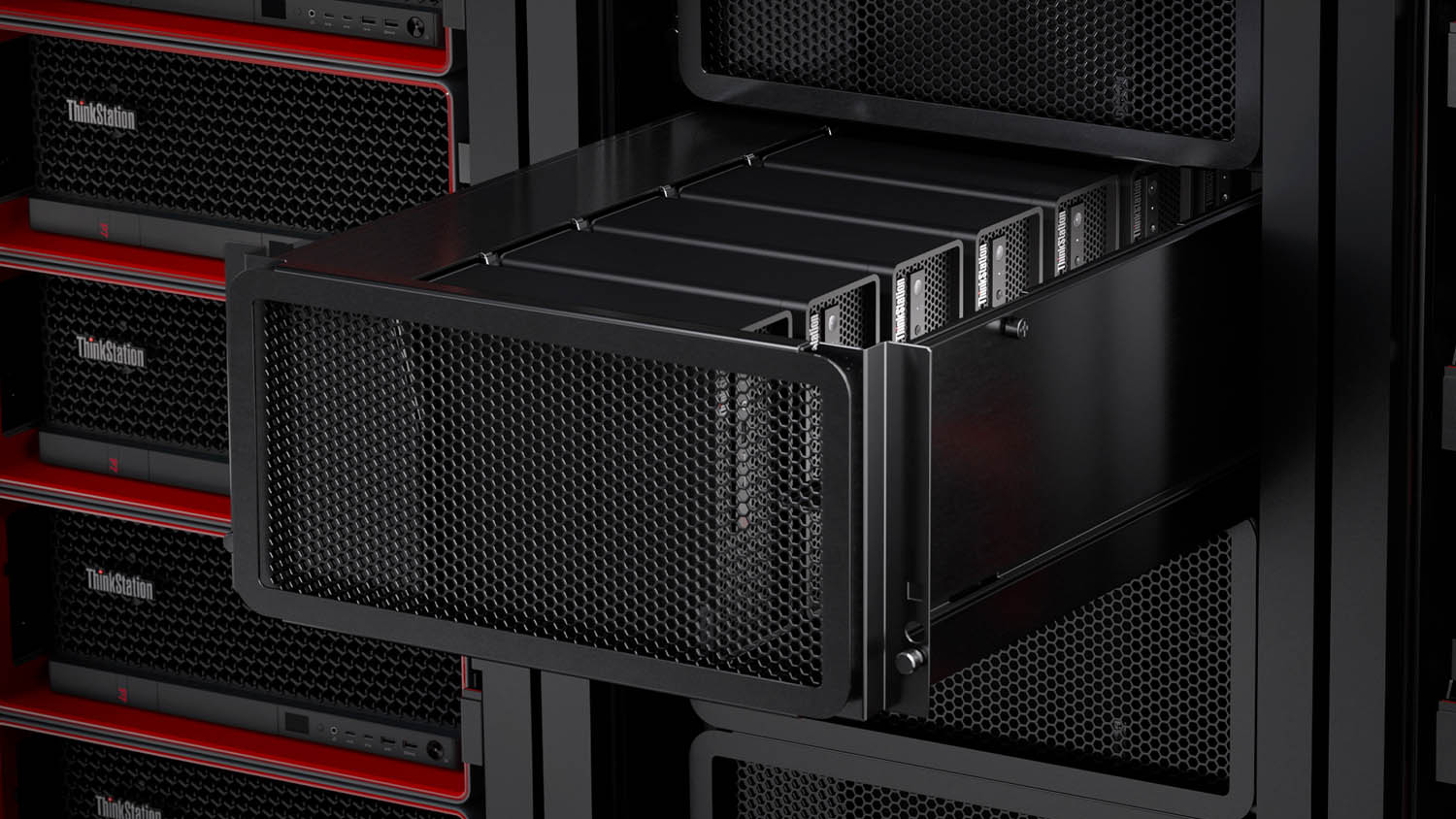
The Access story begins with the ThinkStation P3 Ultra SFF, where up to seven of the small form factor workstations are housed in a 5U ‘HyperShelf’, a custom tray developed by RackSolutions. That concept has now expanded with the ThinkStation P3 Tiny, which offers even greater density — up to twelve ultracompact workstations in the same 5U space.

Instead of carving up shared servers, Lenovo Access centralises one to one physical desktop workstations – the ThinkStation P series – in racks, then layers on management, monitoring, brokering and remoting protocols

The ThinkStation P3 Ultra SFF has some clear technical benefits over the ThinkStation P3 Tiny, including a choice of more powerful GPUs up to the Nvidia RTX 4000 SFF Ada Generation, and support for a dedicated Baseboard Management Controller (BMC) PCIe card for out of band management. The Tiny lacks a PCIe slot for that, instead relying on Intel vPro and tools such as Lenovo Device Orchestration.

IT admins don’t get the same level of hardware level control, acknowledges Hirst, but you gain higher density and lower cost. Many customers, he says, “just want the basic functionality” and already “have ways of managing their devices.”

The mechanical design of the HyperShelf itself has evolved too. The original design simply let the external power supplies hang lose to the side, but in the case of maintenance or failure, customers found it too easy to pull out the wrong cable. A new Gen 2 release makes cable management simpler, and each PSU now sits vertically in a cradle and clearly corresponds to a specific workstation.


Lenovo
Up to seven Lenovo ThinkStation P3 Ultra SFF workstations can be housed in a 5U ‘HyperShelf

Given the density — seven Ultras or twelve Tinys per 5U shelf — thermal behaviour is critical. Hirst stresses that Lenovo and RackSolutions “put it through some pretty rigorous tests to make sure that we’re not going to throttle performance” The shelf relies on front to back airflow with an exhaust fan at the rear.

From a purchasing standpoint, customers can still treat this as a standard Lenovo order. The shelf and supporting parts are available through Lenovo, and as an extension of that, through Lenovo partners.

Lenovo Access isn’t limited to the CAD-focused ThinkStation P3 Series — it also extends to Lenovo’s large tower workstations: the Threadripper Pro-based P8 and Intel Xeon-based P7 and PX. This gives customers a choice of multi-core, multi-GPU, high-memory powerhouses capable of handling the most demanding workflows, albeit at a much lower density.

Of course, there’s also a hard headed economic side. Hirst is very explicit that Access has to be financially competitive: “If it doesn’t come in less expensive than the competition, than the cloud or VDI, then nobody’s going to adopt it.” He argues that the current Access model “checked all those boxes” — strong user experience, manageable administration at scale, and “saving the customer money as well.”

Then there’s the certification angle. Some software developers, such as Dassault Systèmes and Catia, still certify hardware at the workstation level. “Where that workstation sits, is not critical,” says Hirst, , meaning Lenovo can draw on the same rigorous testing and certification process it has relied on for its desktops for decades.

Blueprints: modular “cookbooks”

Access is not a single appliance or rigid reference design. Lenovo describes it as a set of Blueprints: validated combinations of hardware, remote protocols like Mechdyne TGX or Microsoft RDP, connection brokers like LeoStream, and management tools that partners and customers can adapt.

Specialist partners such as IMSCAD and Creative ITC already have mature stacks of their own. In that context, Lenovo’s job is to evaluate and document what works well on ThinkStation, not dictate a single stack.

Each blueprint comes with a bill of materials and installation guide. For example, the P3 Ultra + TGX + LeoStream design includes step by step instructions for installing each module. Hirst frames it quite literally as following a recipe.

Collaboration beyond screen sharing Lenovo’s preferred remoting protocol in many Access Blueprints is Mechdyne TGX. It’s chosen partly for efficiency at high resolutions, but perhaps more importantly for how it handles collaboration.

For design teams, high definition, multi monitor setups are becoming standard. Hirst notes that “everyone seems like they’ve got 4K displays on their desks nowadays. The more pixels you send, the harder it is”. TGX, he says, is “very efficient in what it does,” and “very good at matching to whatever your local configuration is” – whether that’s two displays mirrored from the remote workstation while keeping a third display local, or other layouts.

Where it really stands out, though, is multi user sessions. TGX allows multiple collaborators to connect to the same remote workstation, and any user can be handed control. That makes it ideal for design reviews or training: one user can drive Revit or a visualisation tool while a senior architect or engineer “connect[s] to that same session at the same time, sharing keyboard and mouse control.”

Unlike typical meeting tools, Hirst notes that TGX avoids dropping to the “lowest common denominator” connection. Many protocols, he says, will “dumb everything down to the lowest network configuration,” giving everyone the worst experience. TGX instead maintains “a separate stream for each collaborator,” so each participant gets a “super high, responsive, interactive experience, full fidelity, full colour.”

Audio and video conference tools still have their place — collaborators typically use it alongside Microsoft Teams, keeping voice and video there while TGX handles the heavy graphics. Under the hood, TGX offloads encoding to Nvidia NVENC on the workstation GPU — “you need to have an Nvidia GPU on the sender at a minimum” for the best experience, notes Hirst — and can decode efficiently on the client using Nvidia or Intel integrated graphics. The Intel decode path, Hirst notes, has improved to the point where “the difference is pretty minimal,” enabling much lighter, cheaper client devices than before.


Proof before commitment

To make these concepts tangible, Lenovo has built a Centre of Excellence for Access. Initially set up in Lenovo’s HQ in Raleigh, North Carolina, it now extends via environments hosted by partners such as IMSCAD and Creative ITC in London, with a new deployment underway at Lenovo’s Milan headquarters and plans for Asia Pacific.

The idea is straightforward: customers can test real workloads on real Access Blueprints without touching their own firewall or infrastructure. They can “just come and access our environment” to see how a P3 Ultra plus TGX plus LeoStream behaves with their tools and data.

Hirst notes that this originated as an internal initiative at Lenovo: “We’ve gone from proof of concept to deployment. And yes, that’s what our customers are trying to do.”

Now that the centre is mature, it doubles as an adoption engine. The conversion rate from VDI/cloud to one to one workstations is striking: he estimates that “eight out of ten” organisations that try the Centre of Excellence and compare it with their existing setups end up “converting,” because “there’s a noticeable difference.”

Partners and private clouds

Access is also reshaping Lenovo’s relationships with partners. Some of the companies now building Access-based offerings were originally VDI specialists. Hirst notes that customers frustrated with VDI performance are starting to look to private cloud and as a service offerings anchored on one to one workstations instead.

Hirst sees strong interest in this route, especially from firms wary of putting IP entirely in public clouds: organisations are “shifting more towards that private environment,” keeping some workflows in the public domain but moving “confidential IP… in a private environment”. For many, the answer is not to run their own datacentre but to work with partners like Creative ITC or IMSCAD “in order to manage that as a service for them.”

At the same time, large generalist resellers such as CDW are looking for ways to move beyond pure box shifting.

Hirst points out that for standard resellers, competition “really comes down to price,” with “margins… squeezed” and “no way to differentiate” beyond discounting. Solutions like Access let them “talk about solutions in different ways,” focusing on solving customer problems — remote user experience, manageability, data locality and cost — instead of battling solely on unit price.

New-school

As remote and hybrid work starts to become the default, the choice for design centric firms is no longer between “old school” desk side workstations and virtualised cloud desktops. Lenovo Access argues for a third path: keep physical, ISV-certified workstations close to your data, manage them like a shared service, and deliver them securely to any location — with high frequency CPU clocks and dedicated GPUs still working exactly as the applications expect.

See here for a full review of the Lenovo ThinkStation P3 Ultra SFF, plus details about how design and engineering firms are deploying P3 Ultra-based rack solutions.


Main image: Rendering of RackSolutions HyperShelf for Lenovo ThinkStation P3 Ultra SFF


This article is part of AEC Magazine’s 2026 Workstation Special report

Advertisement

Leave a comment